Goal
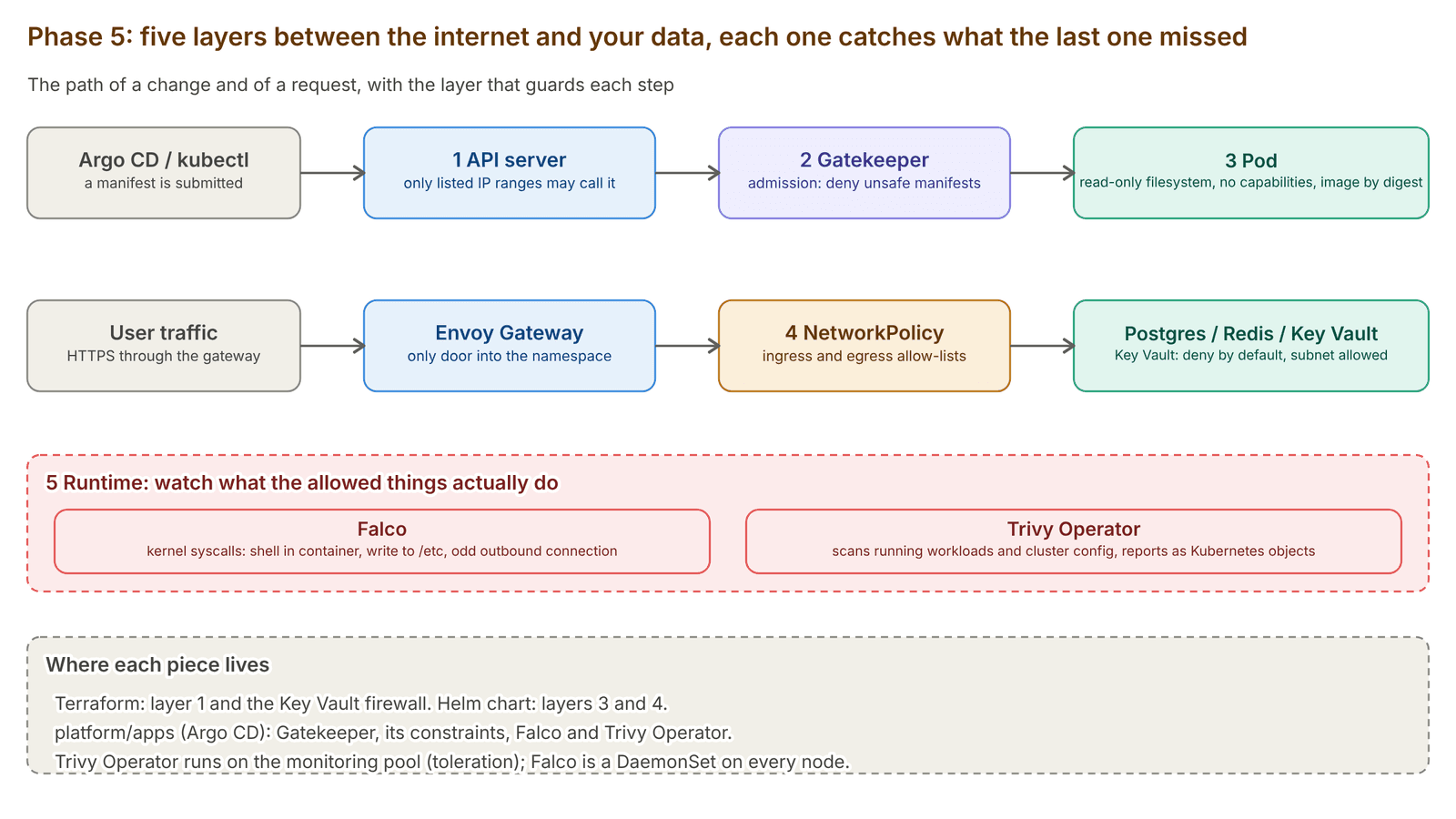
Phases 1 to 4 made the app correct, repeatable and automatically deployed. This phase asks what happens when something goes wrong or someone hostile gets in. A stolen kubeconfig, a vulnerable dependency or a bad image should each be stopped by a different layer.
- Network hardeningThe API server and Key Vault answer only listed networks.Live
- Admission controlGatekeeper checks every pod against seven policies, all enforced with deny.Live
- Pod hardeningRead-only root filesystem, no extra capabilities, images pinned by digest.Live
- Egress controlEach workload may reach only what it needs, and no API token is mounted.Live
- Runtime detectionFalco watches system calls; Trivy Operator keeps vulnerability reports.Live
Steps and commands
Run these in dev first. Every step has a check that proves it worked, so you are never guessing.
Restrict who can reach the API server and Key Vault
Add authorized IP ranges and a Key Vault firewall in Terraform, then read the plan before you apply it.
$ terraform init
$ terraform plan -out p5.tfplan
$ terraform show p5.tfplan | grep -E "will be|must be|forces replacement"
$ terraform apply p5.tfplan
Check: kubectl get nodes from a network that is not on the list times out; yours still works.Install Gatekeeper and roll policies out slowly
Each constraint moves through dryrun, warn and deny, and only after its audit list is empty.
$ kubectl get constrainttemplates
$ kubectl get constraints
$ kubectl describe k8spspreadonlyrootfilesystem | sed -n '/Violations/,$p'
Check: the audit shows zero violations before you raise the enforcement level.Prove a policy both ways
Reject a pod that breaks the rule, for the reason you expect, and admit the real deployment. The test pod must be compliant in every other respect.
$ kubectl -n paktech-chat-dev apply --dry-run=server -f test-pod-tag-only.yaml
# Forbidden: uses an image without a digest
$ kubectl -n paktech-chat-dev apply --dry-run=server -f test-pod-digest.yaml
Check: the tag-only pod is rejected with the digest message and the digest pod is admitted.Turn on egress policies in dev
Take a baseline of what every pod can reach, enable the flag, then run the same test again and compare.
$ bash scripts/egress-test.sh paktech-chat-dev     # before
$ kubectl get networkpolicy -n paktech-chat-dev
$ bash scripts/egress-test.sh paktech-chat-dev     # after
Check: the metadata address and port 80 flip from OPEN to BLOCKED; postgres, redis and the app still work.Stop mounting the Kubernetes API token
None of the app pods call the Kubernetes API, so the default service account token is pure risk.
$ kubectl exec -n paktech-chat-dev deploy/api -- ls /var/run/secrets/kubernetes.io/serviceaccount
# ls: cannot access ... No such file or directory
Check: the pods start, secrets still mount, and the folder is gone.Check Falco and the vulnerability reports
Run a throwaway pod that reads a sensitive file, then read what Falco and Trivy Operator saw.
$ kubectl get pods -n falco -o wide
$ kubectl logs -n falco -l app.kubernetes.io/name=falco --tail=20
$ kubectl get vulnerabilityreports -n paktech-chat-dev -o wide
Check: Falco logs a sensitive-file event with pod, namespace and image, and the reports list your images.
Workflow
Every control ships the same way: behind a flag that is off by default, so merging changes nothing until you enable it for one environment.
- STEP 1Flag offMerge, nothing changes
- STEP 2DevBaseline test first
- STEP 3VerifyAfter-test and app check
- STEP 4StagingSame test, same check
- STEP 5ProdManual sync
Rollback: Set the flag back to false (or lower the constraint to warn), merge, and Argo CD removes the policies.
Diagram
Issues met
These are real, from the run. The surprises are the useful part.
Trade-offs
Why: It is cheap, quick to roll back and needs no VPN or jump host for a one-person lab.
It costs: The API endpoint stays public, so the allow-list must follow your IP when it changes.
Why: If the policy pod is down, the cluster can still be repaired.
It costs: A short window with no admission checks, covered by audits and the other layers.