Goal
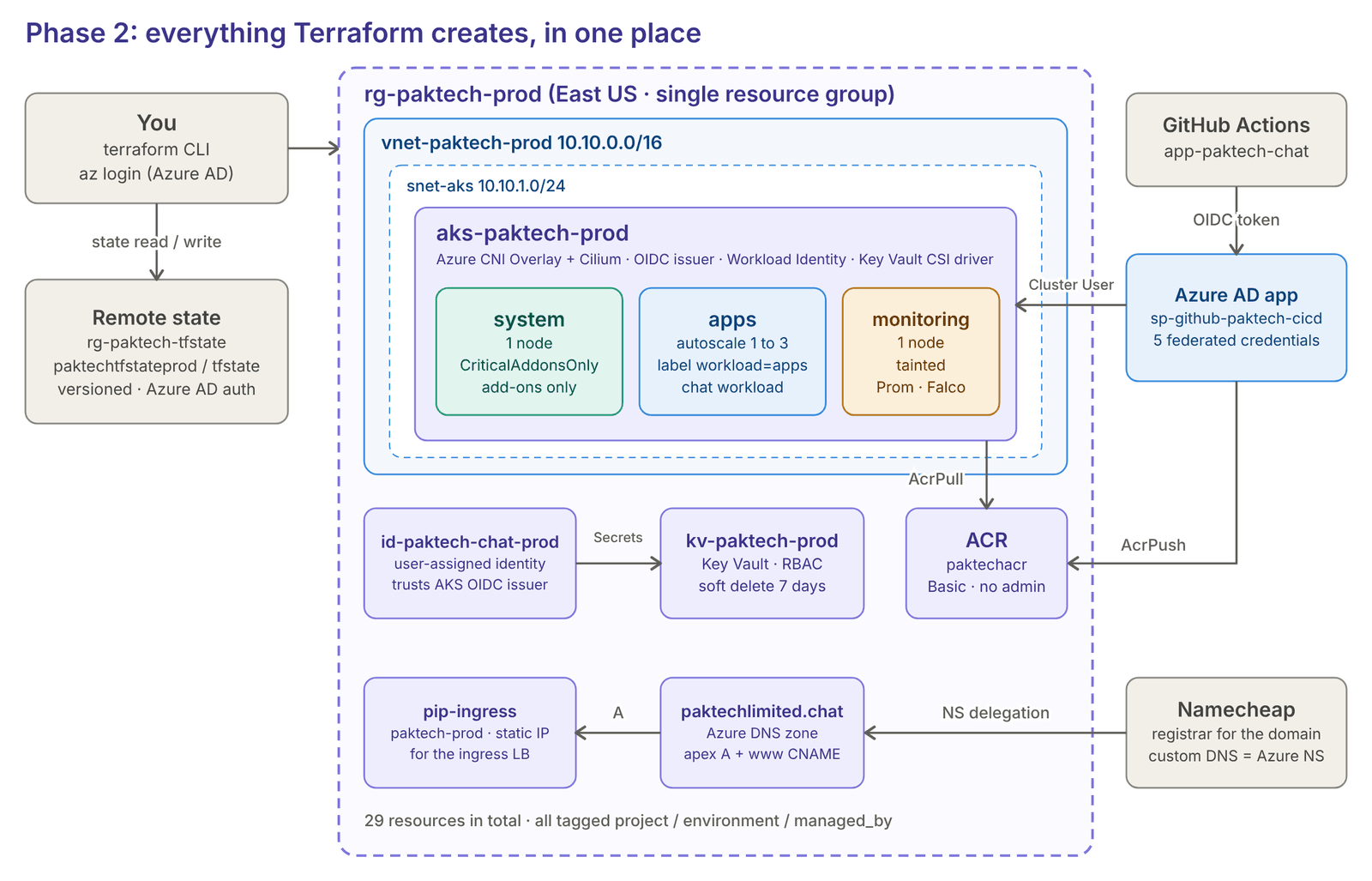
A repeatable Azure platform that you can destroy and rebuild: three node pools, a private registry, a vault with RBAC, workload identity for pods, GitHub OIDC for the pipeline and DNS for the domain, all in Terraform with remote state in a separate resource group.
- Remote stateA separate resource group and private storage account, so destroying the platform never touches the state.Done
- AKS with three node poolssystem (tainted for add-ons), apps for workloads, monitoring (tainted) for observability.Done
- Registry and vaultACR Basic with admin disabled; Key Vault with RBAC and soft delete.Done
- Identity without secretsWorkload identity for pods and GitHub OIDC for the pipeline. No client secret exists.Done
- DNSAn Azure DNS zone for the domain with Terraform-managed records.Done
Steps and commands
Run these in dev first. Every step has a check that proves it worked, so you are never guessing. The first apply planned and created 29 resources, and a second plan showed no changes.
Check the tools and sign in with MFA
Confirm versions and log in. If your tenant requires MFA for management operations, use the claims login command the error prints.
$ az version
$ terraform version      # needs >= 1.6.0
$ az login
$ az account show -o table
Check: the subscription you expect is the active one.Create the remote state
A separate resource group, a private storage account and a container, using your Azure AD token instead of an account key. In Git Bash, stop path rewriting first.
$ export MSYS_NO_PATHCONV=1
$ az group create rg-paktech-tfstate
$ az storage container create --auth-mode login ...
Check: terraform init succeeds and connects to the azurerm backend.Validate, plan, read the plan, apply
Read the plan before you apply it. Save it to a file so apply runs exactly what you reviewed.
$ terraform init
$ terraform fmt -recursive
$ terraform validate
$ terraform plan -out tfplan
$ terraform apply tfplan
Check: the plan says 29 to add, 0 to change, 0 to destroy, and a second plan shows no changes.Verify the platform
Check the node pools and taints, the registry settings and the vault, then read the outputs.
$ kubectl get nodes -L workload,agentpool
$ az acr show -n paktechacr --query "{sku:sku.name,admin:adminUserEnabled}" -o table
$ terraform output
Check: three pools are present, ACR admin is false, and the DNS name servers are printed.Stop the cluster when you are not working
The lab cluster costs money while it runs, so stop it between sessions.
$ az aks stop  -g rg-paktech-prod -n aks-paktech-prod
$ az aks start -g rg-paktech-prod -n aks-paktech-prod
Check: powerState.code reads Stopped, then Running after a start.
Workflow
Infrastructure changes follow the same read-then-apply path every time.
- STEP 1EditTerraform files
- STEP 2Validatefmt and validate
- STEP 3PlanSave to a file
- STEP 4ReviewRead every change
- STEP 5ApplyApply the saved plan
Rollback: Revert the change in Git and apply again, or destroy only the resources you added. The state lives outside the platform, so it survives a destroy.
Diagram
Issues met
These are real, from the run. The surprises are the useful part.
Trade-offs
Why: It gives hands-on experience with storage, identity and backups.
It costs: You own upgrades and recovery. In production I would use managed services.
Why: It is cheap for a lab, and access goes through identities instead of a shared password.
It costs: No geo-replication or private link on this tier.